This is a pretty neat way to get some websites in dark mode using uBlock.
These uBlock filters seem to work on most websites, but unfortunately not all of them.
They work by simply invert the colors of the website. So you can also use make a dark website brighter.
Here’s what BBC.com look like with these uBlock Darkmode filters.
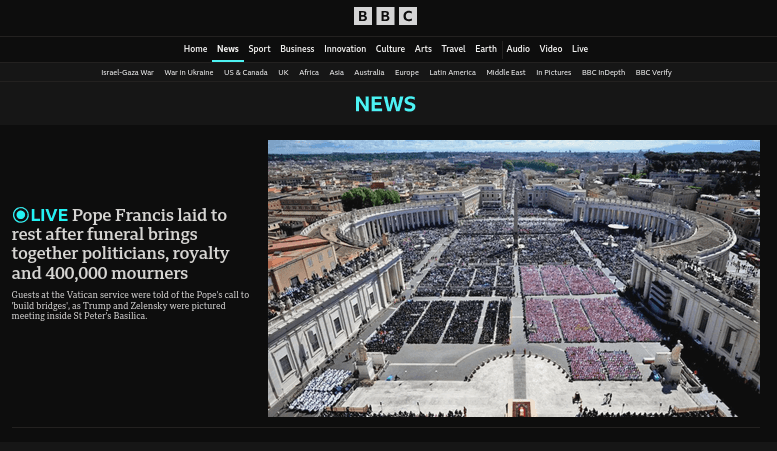
To add the filters, Open uBlock Dashboard and click on click on “My filters”.
Copy the following uBlock filters and add the domains you want to use them on:
psychologytoday.com##html:style(filter: invert(95%) !important;)
psychologytoday.com##img,picture:style(filter: invert(105%) !important;)

bbc.com##html:style(filter: invert(95%) !important;)
bbc.com##img,picture:style(filter: invert(105%) !important;)

aljazeera.com##html:style(filter: invert(95%) !important;)
aljazeera.com##img,picture:style(filter: invert(105%) !important;)
You can always try to modify the filters if you experience some website that they won’t work with.
Some websites doesn’t need to invert the style of the pictures for example.
Related posts:

RARBG Tracker not Working? Read Why + Fix it!
One of the most popular torrent websites called RARBG did sh...
Visual Subst - Virtual Drives Shortcuts To Folders
Visual Subst is a great tool to save some time while browsin...
Make a server folder an open directory
Mostl of the times you'll wont be able to access directories...