
NN ShortSearch is a simple yet very handy search tool for your web browser.
Select a website with a simple command and search it in a second, directly from your browsers URL bar by just typing shortcuts. No extension or app is needed, just add a URL to your custom search engines.
Currently there’s about 80+ different sites you can search with fast commands from the URL bar.
For example, you can search directly in IMDB, Google, Bing, YouTube, Amazon, Stocks, Crypto, Steam, Fiverr, Fileextension, Deviantart, Trustpilot, Dictionary, Soundcloud, Github and many more!

Examples – How you will be able to use NN ShortSearch
In your web browsers URL adress bar you will type something like:nn imdb titanic
And you’ll directly end up on IMDB with the search result for movies called “titanic”.
Another example with Youtube:nn youtube cool travel blog
and you’ll get to YouTube’s search results for “cool travel blog”.
The reason you have to type nn is because it acts as a shortcut to NordicNodes Search Script.
After nn , just type what website/service you want to search and then what you want to search after.
Some of the more popular sites/search engines:
Here’s a list with some commands. (It’s not complete. I’m working on it.)
Notice that some Search engines for Aliases. Search Youtube with with “nn youtube cool stuff”, “nn ytube cool stuff” or “nn yt cool stuff”.
I will update the list with more search commands & fix errors. All search engines added in the future will work directly for you. You don’t have to update anything later. :)
You need to add the NN ShortSearch first to use it. But it’s simple, it takes less than 20 seconds.
How to add NN ShortSearch in your browser
Microsoft Edge – How to add NN ShortSearch it to your browser
If you use Microsoft Edge.
Go to this URL:edge://settings/searchEngines
Click on “Add” and fill in the following info:
Search engine
NordicNode
Shortcut
nn
URL with %s in place of query
https://www.nordicnode.com/shortsearch.php?keyword=%s
Brave Browser or Chrome? This is how to add NN ShortSearch!
In Brave Browser or Chrome, go to:brave://settings/search
orchrome://settings/search
Click on “Manage search engines and site search”.
Then click the “Add” button next to “Site Search” and fill out this info:
Search engineNordicNode
Shortcutnn
URL with %s in place of queryhttps://www.nordicnode.com/shortsearch.php?keyword=%s
And you’re done!
Firefox – Add NN ShortSearch like this!
Click on CTRL and B to open the bookmark manager.
Right-click on Bookmarks Menu, Other Bookmarks or just somewhere so you see the menu were you can click “Add bookmark…”.
Add in these details as shown in the screenshot below.
The 2 most important parts is the URL and the Keyword.
URL should be:https://www.nordicnode.com/shortsearch.php?keyword=%s
And Keyword needs to be:nn
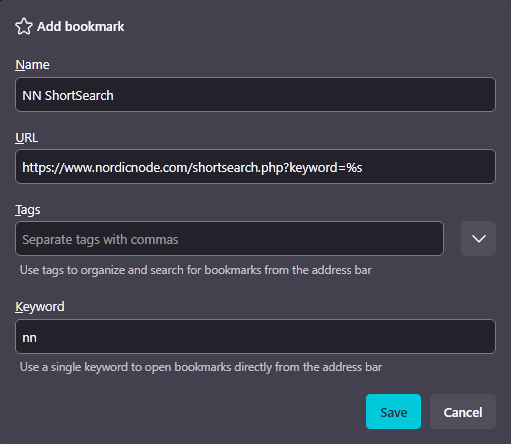
When done, just save it!
That’s it! Try out some of the search commands!
Post a comment if you want me to add a search shortcut to some site or if you find some bug. (Thanks!)