Brave didn’t handle Picture-in-Picture (PiP) very well when using YouTube for example.
I wanted it to be “on top” / “on screen” over the other tabs I was browsing.
Sometimes I didn’t even have that option to click on in the YouTube player.
But the solution is so simple that it’s nearly embarrassing.
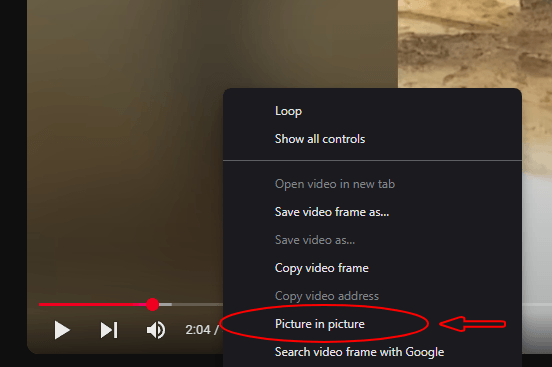
When you play your YouTube video or a video from some other website in Brave or a Chrome based web browser. You just have to right click 2 times on the video. :D
Then you’ll hopefully see this menu as in the picture below.
And there you’ll be able to choose Picture in Picture.
I told you the solution was simple, right? ;)
No need for extra extensions or messing around in browser settings and such.
And unlike when using the regular “Picture in Picture” button on the YouTube player, this will make the video stay on top even if you change tabs.
If this solution still doesn’t work for you. Try to install a extension such as this one from the Chrome web store.
By the way, another thing when it comes to web browsers.
Check out this neat little thing I made, called NN ShortSearch. (it’s not a extension!).
It will enable you to use your URL bar to use lots of services/websites with a short command.
By adding this as a “search engine” in the web browser settings you’ll be able to quickly access 80+ services.
It got all kind of different services. Search engines, IMDB, Translate websites, Check cryptocurrency prices, Weather, Wikipedia and many more.
Related posts:

Show colors in HEX, RGB, HSL in Firefox Inspector
Make a server folder an open directory