I got dual monitors and wanted to have different wallpapers on each monitor. But every time I tried it change both monitors wallpapers to the same one.
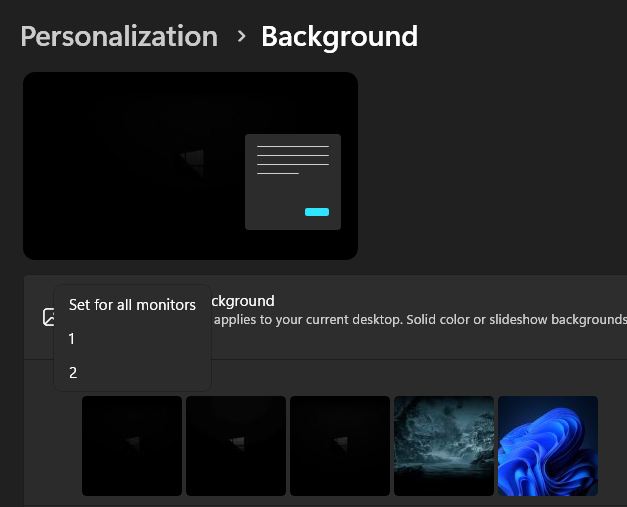
What you need to do is to go to:
Start -> Settings -> Personalization -> Background
If you have your wallpapers under “Recent Images” try to Right-click on them!
That’s how where you can select “Set for all monitors”, “Screen #1” and “Screen #2”.
I feel so stupid to not figure this out earlier. :D
By the way, Pixabay is a website with lots of Wallpapers in really high quality.
Related posts:

Amuse AI - Create NSFW content! Disable the Content Filter
Amuse is a really fun, easy to use & free AI application...
Optimize Windows 10 with this tweak!
The easiest way to optimize Windows 10 and give it a bit of ...

Torrent trackers to announce to 2022
It's a new year and torrent old trackers die and new ones ar...